71. All Hallows Eve
Oct. 5th, 2012 01:45 pm![[identity profile]](https://www.dreamwidth.org/img/silk/identity/openid.png) sireesanwar.livejournal.com posting in
sireesanwar.livejournal.com posting in ![[community profile]](https://www.dreamwidth.org/img/silk/identity/community.png) layoutlounge
layoutloungeLayout Style: S2 Flexible Squares
Features: Sidebar, Scrolling Tags, Custom Page Summary
Layout Width: 1000px
Layout:
71a. Dark Alternative: { Preview } { Live }

Click here for font tutorial:
Nachtmere, JackLantern BB, Moonlight Shadow
Header 800 x 300

All check out our other Halloween headers.
Background Image:

PLEASE NO HOTLINKING IMAGES
Headers:![[livejournal.com profile]](https://www.dreamwidth.org/img/external/lj-community.gif) graffitigraphic
graffitigraphic
More Background Images: Layout Lounge Site
More Tiny Icons: Layout Lounge Site
RULES:
No Hotlinking Images
Header can be changed
Background image can be changed or removed.
Credit Necessary.
Features: Sidebar, Scrolling Tags, Custom Page Summary
Layout Width: 1000px
 |
71. All Hallows Eve { Preview } { Live } Credit: layout_loungeFor help with layout please consult the How To Guides, otherwise please comment. |
Layout:
71a. Dark Alternative: { Preview } { Live }
Click here for font tutorial:
Nachtmere, JackLantern BB, Moonlight Shadow
Header 800 x 300
All check out our other Halloween headers.
Background Image:
PLEASE NO HOTLINKING IMAGES
Headers:
graffitigraphicMore Background Images: Layout Lounge Site
More Tiny Icons: Layout Lounge Site
RULES:
No Hotlinking Images
Header can be changed
Background image can be changed or removed.
Credit Necessary.


 layout_lounge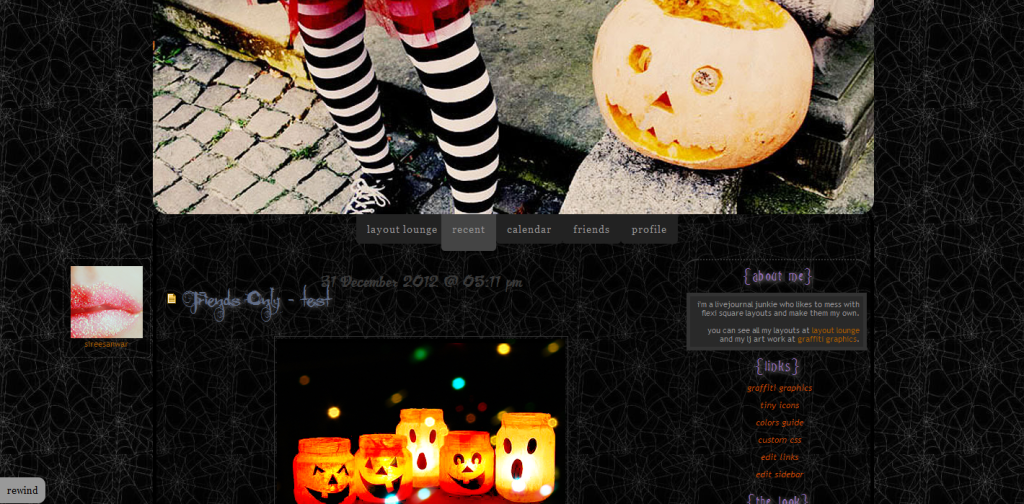
(no subject)
Date: 2012-10-05 11:53 pm (UTC)I'm glad you like it. Enjoy!
(no subject)
Date: 2012-10-06 12:26 am (UTC)I just noticed that this layout doesn't have the Previous link to go back a few pages, and I need to have a way in order to read through the F-Page.
Is there anyway for it to show?
(no subject)
Date: 2012-10-06 12:34 am (UTC)See:
If you can see this then maybe I have to adjust it to the bottom for you.
(no subject)
Date: 2012-10-06 12:42 am (UTC)Ahh!! I feel dumb.
(no subject)
Date: 2012-10-06 12:48 am (UTC)Don't feel dumb. I just tricked you. LOL
Also when you go back a page the next button will be on the opposite side of your browser. Design pretties. ;-)
(no subject)
Date: 2012-10-06 12:45 am (UTC)Find this...
#footer {
bottom: 10px;
padding:5px 0;
position: fixed; <-----------------
right:0;
text-align:left;
text-transform:lowercase;
width:100%;
z-index:0;
}
Change where it says fixed to say inherit and they should move to the bottom of your page. Let me know if that works.