40. 2 Star Trek Geektastic Layouts
Jul. 24th, 2009 03:08 pm![[identity profile]](https://www.dreamwidth.org/img/silk/identity/openid.png) sireesanwar.livejournal.com posting in
sireesanwar.livejournal.com posting in ![[community profile]](https://www.dreamwidth.org/img/silk/identity/community.png) layoutlounge
layoutloungeLayout Style: S2 Flexible Squares
Features: Sidebar, Scrolling Tags, Custom Page Summary
Layout Width: 800px
Requested By:

Click to see larger image - Live Preview
Header 800 x 241

Header Link Background


Click to see larger image - Live Preview
Header 800 x 184

Header Link Background

Fonts Used:
Swiss911 XCm BT
Swiss911 UCm BT
See the Font Tutorial if you need help adding these fonts to your computer system.
Check out Using Layouts on the sidebar for any extra assistance.
Please direct people to![[livejournal.com profile]](https://www.dreamwidth.org/img/external/lj-community.gif) layout_lounge or graffitigraphic.
layout_lounge or graffitigraphic.
Features: Sidebar, Scrolling Tags, Custom Page Summary
Layout Width: 800px
Requested By:
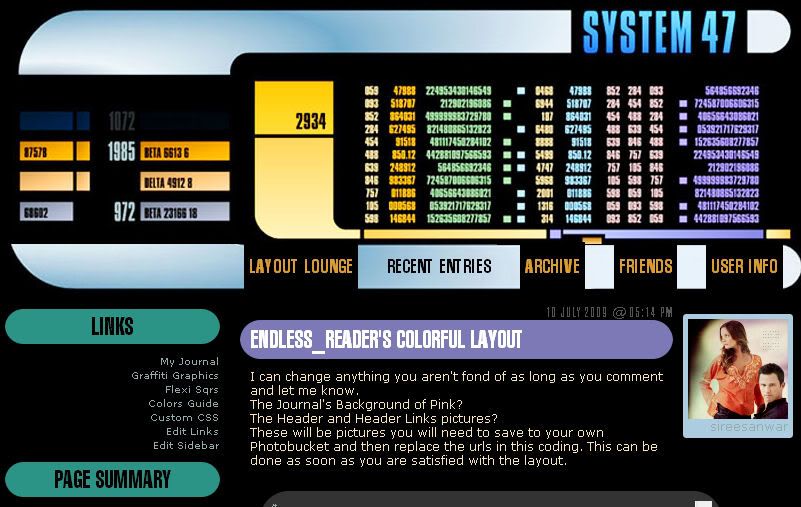
Click to see larger image - Live Preview
Header 800 x 241
Header Link Background
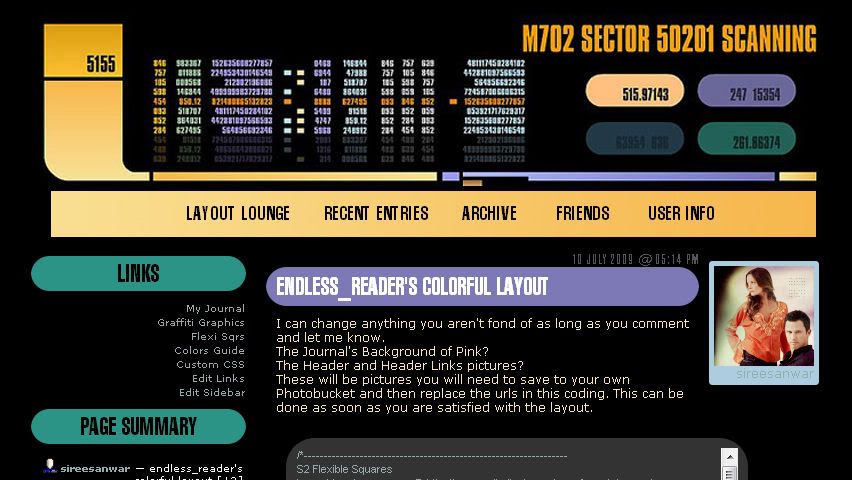
Click to see larger image - Live Preview
Header 800 x 184
Header Link Background
Fonts Used:
Swiss911 XCm BT
Swiss911 UCm BT
See the Font Tutorial if you need help adding these fonts to your computer system.
Check out Using Layouts on the sidebar for any extra assistance.
Please direct people to
layout_lounge or graffitigraphic.


 layout_lounge
(no subject)
Date: 2009-08-31 07:31 pm (UTC)Be as specific as you can because it is hard to convey what we are thinking... point out specific places on the layout you would want to see this....
I don't remember anyone asking for something like that in the past.
(no subject)
Date: 2009-08-31 08:06 pm (UTC)AHA! I found the layout that made me think of it. Here (http://i407.photobucket.com/albums/pp157/scholarslayouts/wedding/preview.jpg)
I want something similar but not exactly the same. I don't want it on the comments. I took a screen shot to show you what I mean. You can see it here (http://i725.photobucket.com/albums/ww256/bouncytime20/NBC.jpg).
You were right. It wasn't the line underneath it was the entire word. So hopefully that explains it a bit better. :D
Also, like in the preview, is it possible to put the default icon on the sidebar or is that another one of those customizations I can do?
Thank you for the link for figuring all that stuff out! You've been a real help and you explain things very well.
Once I have the layout up and running I'm going to do a post that shows the friends only banners because even though I won't be using them right away I want others to be able to see them. From that post I will be letting everyone know, as well as my profile, who made them and the layout and leaving links to your graphics comm and here so they might be able to request from you as well. :)
Which reminds me, do you have a specific way you want to be credited in the profile?
(no subject)
Date: 2009-08-31 09:22 pm (UTC)http://community.livejournal.com/workshop_rees/
The default icon is the same as the page summary. It will be something you change and add in the sidebar customizations.
I send people to
(no subject)
Date: 2009-08-31 09:27 pm (UTC)I love it. I don't think there is anything else that needs to be changed about it.
(no subject)
Date: 2009-08-31 10:33 pm (UTC)I'm so glad you like it.
FYI for the moodtheme I suggested... there is a quick upload moodtheme tutorial in this journal.
(no subject)
Date: 2009-08-31 10:42 pm (UTC)Thank you so much again. After I get everything settled I'll be doing the post that points people in the right direction to you. I'll also be directing them to your help/request desk so that you don't have something like this on your layout comments again lol.
Thank you again, I can't wait to see how it looks on my journal. And just to be sure, you want all images saved to my separate photobucket and then placed in the code stuff...right? I'm really crap at html and stuff lol.
*huggles*!
(no subject)
Date: 2009-09-01 12:30 am (UTC)Thanks!
Yes, all images saved to your photobucket. You will see in the coding places that say (BACKGROUND IMAGE) or (SIDEBAR TITLE IMAGE) or (HEADER IMAGE). These are what you want to change but make sure to leave the ( ).