sireesanwar (![[identity profile]](https://www.dreamwidth.org/img/silk/identity/openid.png) sireesanwar.livejournal.com) wrote in
sireesanwar.livejournal.com) wrote in ![[community profile]](https://www.dreamwidth.org/img/silk/identity/community.png) layoutlounge2012-10-05 01:45 pm
layoutlounge2012-10-05 01:45 pm
sireesanwar.livejournal.com) wrote in layoutlounge2012-10-05 01:45 pm


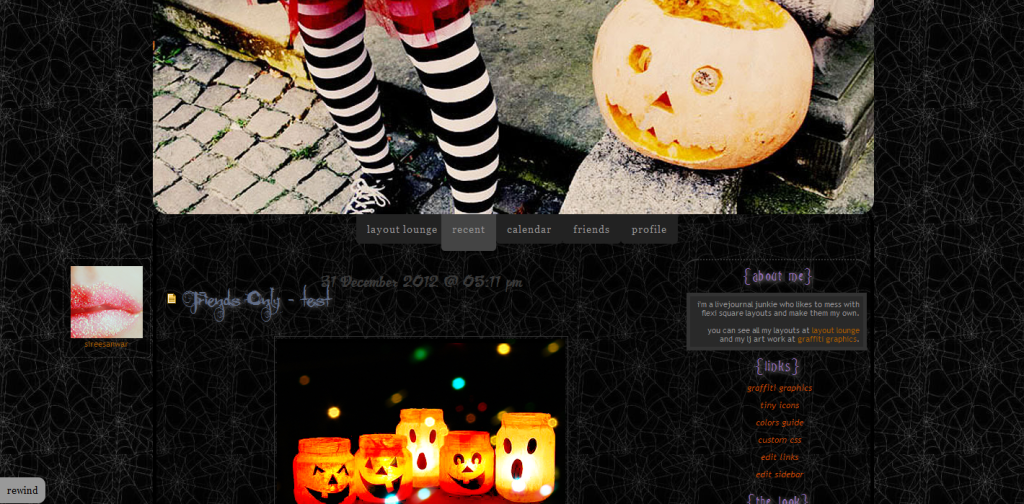
71. All Hallows Eve
Layout Style: S2 Flexible Squares
Features: Sidebar, Scrolling Tags, Custom Page Summary
Layout Width: 1000px
Layout:
71a. Dark Alternative: { Preview } { Live }

Click here for font tutorial:
Nachtmere, JackLantern BB, Moonlight Shadow
Header 800 x 300

All check out our other Halloween headers.
Background Image:

PLEASE NO HOTLINKING IMAGES
Headers:![[livejournal.com profile]](https://www.dreamwidth.org/img/external/lj-community.gif) graffitigraphic
graffitigraphic
More Background Images: Layout Lounge Site
More Tiny Icons: Layout Lounge Site
RULES:
No Hotlinking Images
Header can be changed
Background image can be changed or removed.
Credit Necessary.
Features: Sidebar, Scrolling Tags, Custom Page Summary
Layout Width: 1000px
 |
71. All Hallows Eve { Preview } { Live } Credit: layout_loungeFor help with layout please consult the How To Guides, otherwise please comment. |
Layout:
71a. Dark Alternative: { Preview } { Live }
Click here for font tutorial:
Nachtmere, JackLantern BB, Moonlight Shadow
Header 800 x 300
All check out our other Halloween headers.
Background Image:
PLEASE NO HOTLINKING IMAGES
Headers:
graffitigraphicMore Background Images: Layout Lounge Site
More Tiny Icons: Layout Lounge Site
RULES:
No Hotlinking Images
Header can be changed
Background image can be changed or removed.
Credit Necessary.
no subject
no subject
no subject
If you are saving your image in the scrapbook here at lj you need to use the original image link. So click on Original in your scrapbook and it will bring up the image and the url is in the address bar.
I hope that helps. If not I'll be back online on Tuesday.
no subject
no subject
no subject
no subject
Thanks. Enjoy!
no subject
no subject
no subject
Do you have a link to either scarecrow image?
no subject
http://ic.pics.livejournal.com/sireesanwar/10000243/99546/99546_original.gif
Link for single image
http://ic.pics.livejournal.com/sireesanwar/10000243/99813/99813_original.png
no subject
EDIT: Thank you! That did work!
no subject
no subject
no subject
I'm glad you like it. Enjoy!
no subject
I just noticed that this layout doesn't have the Previous link to go back a few pages, and I need to have a way in order to read through the F-Page.
Is there anyway for it to show?
no subject
See:
If you can see this then maybe I have to adjust it to the bottom for you.
no subject
Ahh!! I feel dumb.
no subject
Don't feel dumb. I just tricked you. LOL
Also when you go back a page the next button will be on the opposite side of your browser. Design pretties. ;-)
no subject
Find this...
#footer {
bottom: 10px;
padding:5px 0;
position: fixed; <-----------------
right:0;
text-align:left;
text-transform:lowercase;
width:100%;
z-index:0;
}
Change where it says fixed to say inherit and they should move to the bottom of your page. Let me know if that works.
no subject
no subject
no subject
no subject
no subject
no subject
no subject
no subject
no subject
*oops thought i'd sent this earlier...*
no subject
no subject
no subject
no subject
no subject
no subject
no subject
no subject
no subject
no subject
Using it. ! Will make small changes. But will do credit :)) Thanks !
no subject
no subject
no subject
no subject